


As an influencer, your bio link is one of the most valuable pieces of digital real estate you have. Whether you’re on Instagram, TikTok or YouTube, you only get one clickable link — and it needs to work hard for you.
That’s why choosing the right link in bio tool matters. A great tool lets you share all your content, track what your audience clicks, and present a polished, branded experience — all from one URL.
In this guide, we compare the best link in bio tools available in 2026, so you can make the right choice for your audience and your brand.
What Influencers Need from a Link in Bio Tool
Not all link in bio tools are created equal. As an influencer, here’s what actually matters:
- No forced branding — Your page should look like you, not like the platform you’re using
- Custom design — Colors, fonts and themes that match your visual identity
- Click analytics — Know exactly which links your audience engages with
- Fast setup — You shouldn’t need a developer to get started
- Works on all platforms — Instagram, TikTok, YouTube, Twitter/X and more
The Best Link in Bio Tools Compared
1. LinkVista — Best Overall for Influencers
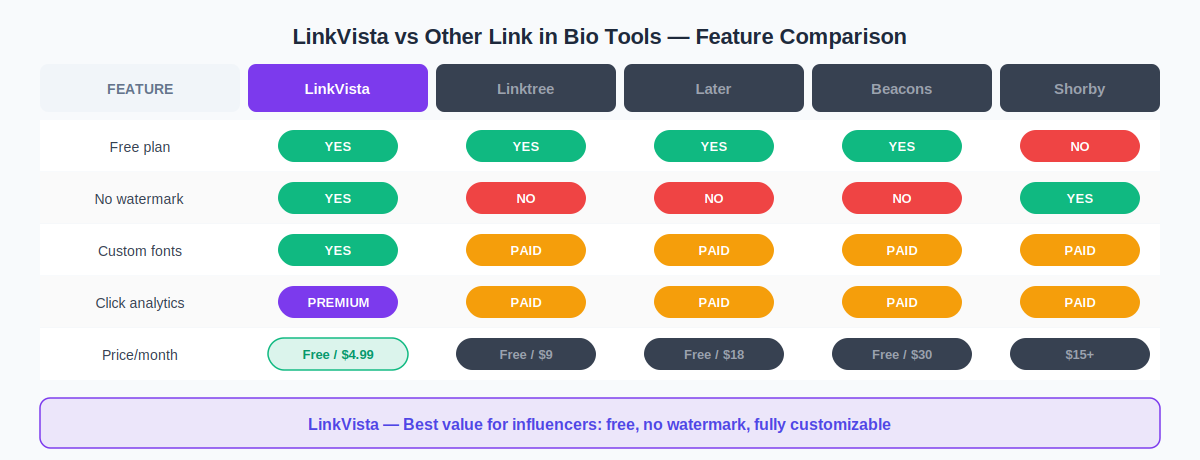
LinkVista is a free, self-hosted link in bio tool built specifically with creators in mind. It stands out from the crowd by offering premium-level customization on the free plan — no watermark, no forced branding, and a clean design that reflects your identity.
- 16 font options including Poppins, Playfair Display, Dancing Script and more
- Custom title and bio font sizes and colors — independently
- Multiple button styles: rounded, pill, square, glass, shadow
- Background image upload (Premium)
- Detailed click analytics with CSV export (Premium)
- Works on Instagram, TikTok, YouTube, Twitter/X, WhatsApp and more
Free plan: Available with no watermark
Premium: From $4.99/month — unlimited links, analytics, advanced themes
2. Linktree — Most Recognized
Linktree is the most well-known link in bio tool, but its free plan is limited: forced branding on your page, minimal customization, and basic analytics only. The Pro plan at $9/month unlocks the features influencers actually need.
3. Later — Best for Social Scheduling
Later is primarily a social media scheduling tool with a bio link feature built in. It’s a good option if you already use Later for content planning, but it’s not a standalone link in bio solution. Paid plans start at $18/month.
4. Beacons — Best for Monetization
Beacons focuses on helping creators sell products and monetize directly from their bio page. It charges a 9% commission on free plan sales. If selling digital products is your priority, it’s worth considering — but it comes at a cost.
5. Shorby — Best for Messaging Apps
Shorby focuses on messaging integrations like WhatsApp and Messenger. It’s strong for influencers who drive traffic through DMs. However, there’s no free plan — paid plans start at $15/month.
5 Tips to Maximize Your Link in Bio
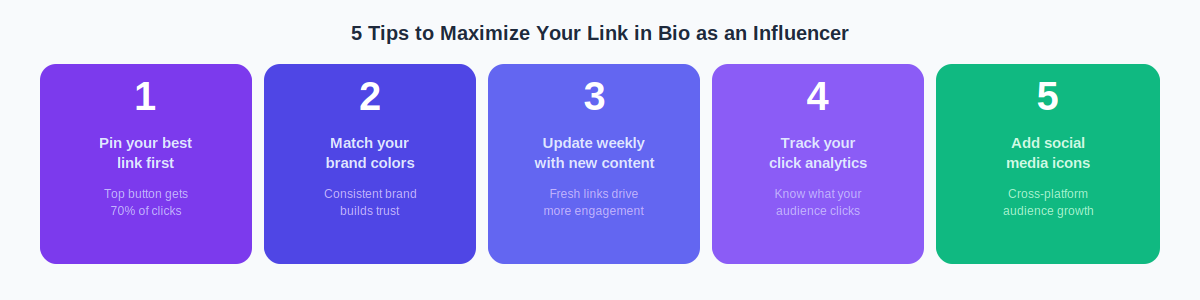
- Put your most important link first — The top button gets the most clicks. Update it every time you launch something new.
- Match your brand colors and fonts — A page that looks like you builds trust and recognition with your audience.
- Update your page weekly — Fresh links keep your audience engaged and coming back.
- Track your analytics — Know which content resonates with your followers so you can create more of what works.
- Add your social media icons — Make it easy for visitors to follow you across every platform.
Our Verdict: Which Tool Should Influencers Use?
For most influencers — whether you have 1,000 followers or 1 million — LinkVista offers the best combination of features, design flexibility and price. The free plan has no watermark and no branding, which is rare. And when you’re ready to grow, the Premium plan at $4.99/month is the most affordable option with full analytics.
If you already use Later for scheduling, stick with their built-in bio link. If monetization through digital products is your focus, Beacons is worth a look. But for clean design, brand consistency and value — LinkVista wins.